

What it notices about your board
ERC and DRC answer one question: does this break a rule KiCad was configured with? A first board usually passes that and still has something wrong with it, because the interesting mistakes are not rule violations. They are decisions.
So the app also reads your schematic’s actual connectivity — which pin joins which net, and what each pin is for — and raises a small number of considerations on the Overview tab.
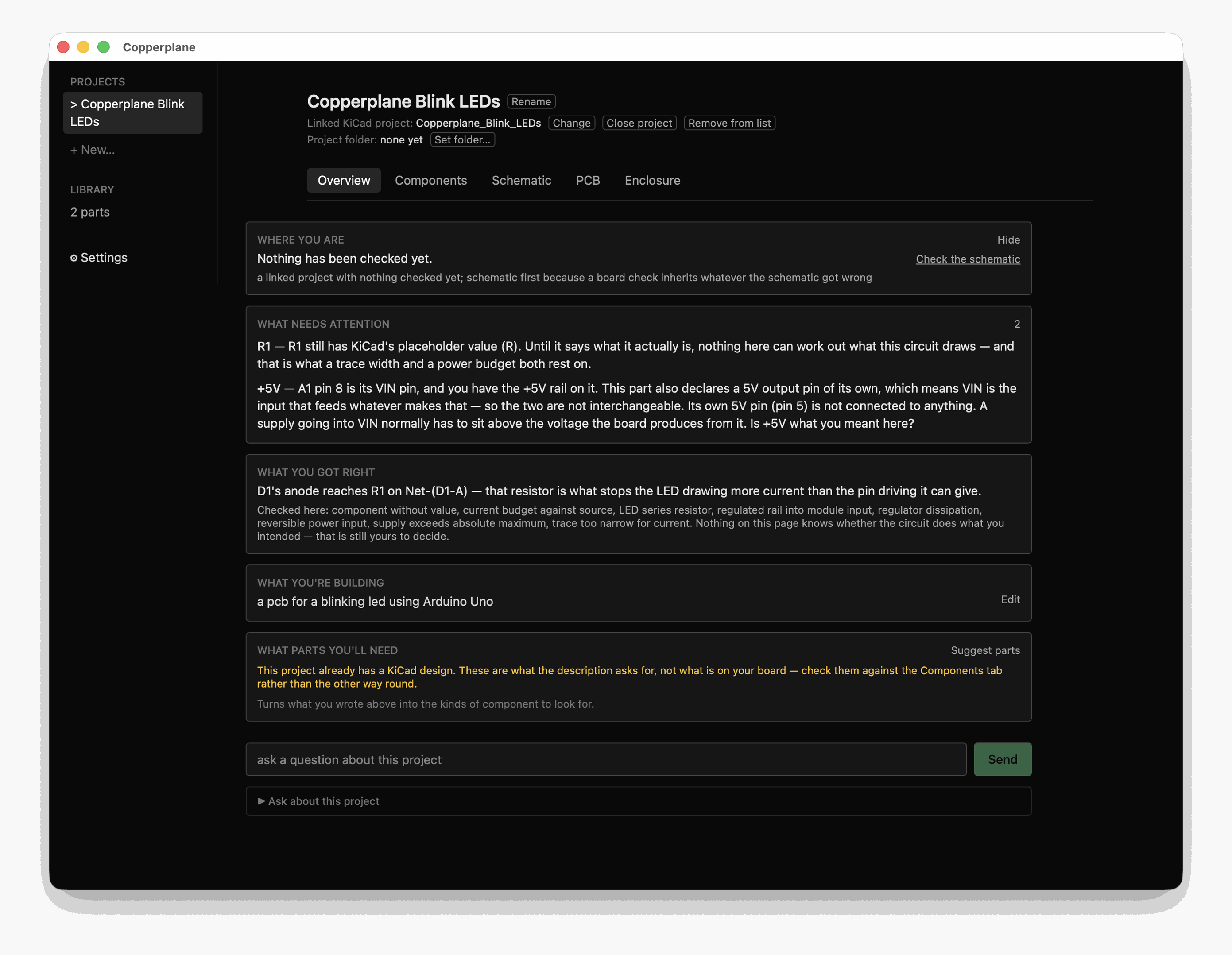
Both findings there are real, on the tutorial project, and neither is an ERC or
DRC violation. R1 still carries the placeholder value KiCad wrote when it was
placed. And the +5V rail is on the Arduino’s VIN pin — the input that feeds
the board’s own regulator — while the pin that actually is 5V sits unconnected
beside it.
Notice how the second one ends. It asks. The app cannot see inside an Arduino module, and a different board might accept 5V there quite happily, so it says what it can see and leaves the judgement with you.
What it checks
Section titled “What it checks”Today, eight things. The list is short on purpose; each one had to be measured against real boards before it shipped, and two written during development were withdrawn for firing on correct designs.
- An LED with no series resistor, keyed on the anode’s net rather than the cathode’s — the first version of this rule fired on ground, where every cathode sits, and was wrong about a board that was fine.
- A part still carrying KiCad’s placeholder value —
Rrather than330R. Not pedantry: until a resistor says what it is, nothing can work out what the circuit draws, and a current budget and a trace width both rest on that. - A linear regulator’s heat.
(Vin − Vout) × Iout, shown as a sum. - A supply trace narrower than the current you said the board draws, computed from IPC-2221 — the same standard KiCad’s own Track Width calculator uses, so you can check the number there and get the same answer.
- A two-pin power header that goes in either way round, when the netlist shows it is what feeds the board.
- A dev board being fed the voltage it makes itself — a
+5Vrail on an Arduino’sVINpin, while the board’s own+5Vpin sits unconnected. - A rail above a part’s absolute maximum, quoting the datasheet row and page it read the rating from.
- More current than your supply guarantees, when you have said the board runs from USB.
How it decides when to speak
Section titled “How it decides when to speak”Nothing is raised without a trigger — something real on your board that the app can name and you can go and look at. A consideration anchored to nothing is a best-practices essay wearing a finding’s clothes, and the app refuses to build one.
Beyond that, what may be volunteered depends on what kind of claim it is:
- Computed — read or calculated from your files. True or false, and you can check it. Volunteered.
- Cited — relaying someone else’s fact, with the source attached: a standard, a datasheet page. Volunteered, with the citation.
- Judgement — an opinion. Legitimate, and never volunteered. Ask for it and you will get it.
Every number says where it came from
Section titled “Every number says where it came from”A finding built on your guess says so. A finding built on a datasheet says which page. A finding resting on an assumption — that your board is 1oz copper, because the file does not say — states the assumption in the same sentence as the number.
This is the part worth trusting the feature over. An unlabelled estimate that happens to be wrong is worse than no estimate at all.
What it will not tell you
Section titled “What it will not tell you”It does not know what your circuit is for. Nothing on the Overview tab has any idea whether the board does what you intended — only whether what you drew is internally consistent and within what the parts allow.
It will also not say a temperature for a regulator. The arithmetic gives watts; turning watts into degrees needs a thermal resistance for that exact part in that exact package on that much copper, and the app does not hold that figure. It tells you the watts and says so.
The count is the whole of the interruption
Section titled “The count is the whole of the interruption”There is no modal, no notification, and nothing arrives while you are working somewhere else. The number beside What needs attention changes when your project changes, and that is the entire mechanism — a signal you are free to ignore until you next look at the tab.
That is a deliberate limit rather than an unfinished one. The app never advances a stage for you, never moves you to another screen, and never opens a conversation you did not start.
When nothing is wrong
Section titled “When nothing is wrong”You get told what was checked and found correct, with one example — not a green tick. A silent check teaches nothing, and “nothing is wrong” is indistinguishable from “nothing was looked at.”
Each of those also names what was not examined, so a clean Overview is never mistaken for a clean board.
Turning it off
Section titled “Turning it off”The guided path is a toggle. Off, the app stops volunteering and answers when asked. Nothing is hidden and no view changes — the considerations are still there if you go looking.
Related
Section titled “Related”- Check a board and a schematic — KiCad’s own ERC and DRC, which answer the other question.
- Read design guidance — what a datasheet says a part needs around it.