

Board houses
A board house is a set of numbers describing what one fab can actually build: how thin a track it can etch, how small a hole it can drill, how close copper may come to the board edge. Copperplane checks your board against those numbers, so “is this manufacturable?” gets answered by the house you are actually ordering from rather than by KiCad’s defaults.
Download
Section titled “Download”These were read off each vendor’s own published capability page on 9 September 2026. Each is a single file you can import.
| House | Process as published | Source | Download |
|---|---|---|---|
| JLCPCB | 2-layer FR4, 1 oz copper | capability page | jlcpcb-2layer-1oz.json |
| PCBWay | Standard PCB, 1–14 layers | capability page | pcbway-standard.json |
| OSH Park | Two-layer service | docs | oshpark-2layer.json |
| AISLER | 2-layer, 1.6 mm, 35 µm, HASL | design rules | aisler-2layer-35um-hasl.json |
All four in one file: board-houses.json
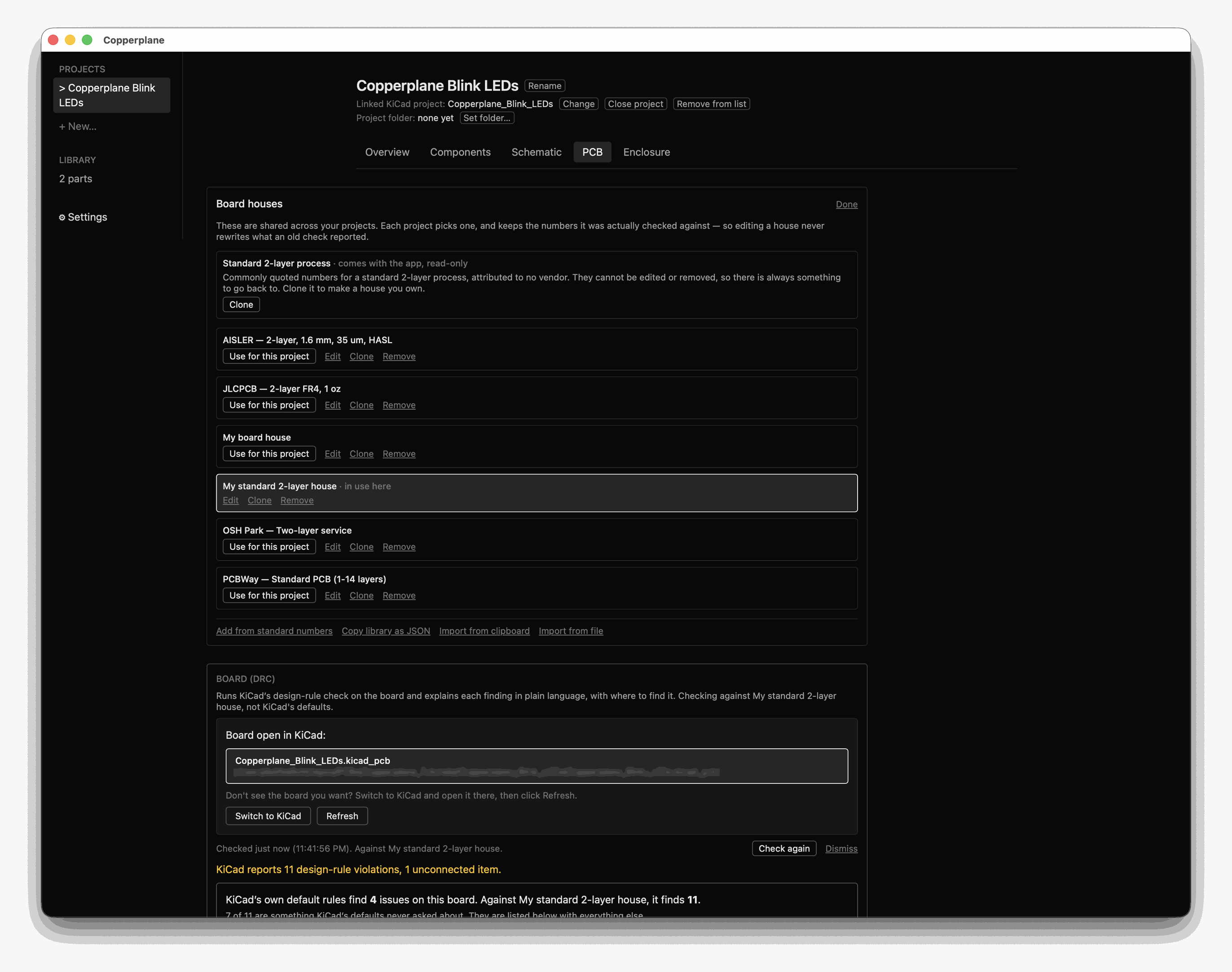
The houses live on the PCB tab, not in Settings — they belong to the check that uses them. They are shared across your projects: each one picks which house to check against, and the numbers stay as you imported them.
Import one
Section titled “Import one”- Download the file (or files) you want.
- In Copperplane, go to PCB → Board houses.
- Click Import from file and choose them.
You can select more than one at a time — picking all four is a single import, not four. If you would rather paste, Import from clipboard takes the same JSON.
If you already have a house with the same id, nothing is imported on the first pass. You are told what clashed and asked to pick: Keep both brings the incoming one in alongside yours, Replace mine overwrites. It asks rather than choosing because only you know whether the copy you have is one you edited.
Imported houses are ordinary houses — editable, clonable, removable. Nothing here is locked, because a house that came from a file can always be got back by downloading it again.
Seeing what a house changes
Section titled “Seeing what a house changes”Pick a house and the check tells you, in the same place, which of its numbers are tighter than KiCad’s own defaults and which are looser — so a clean check against a permissive house is never mistaken for a clean board.
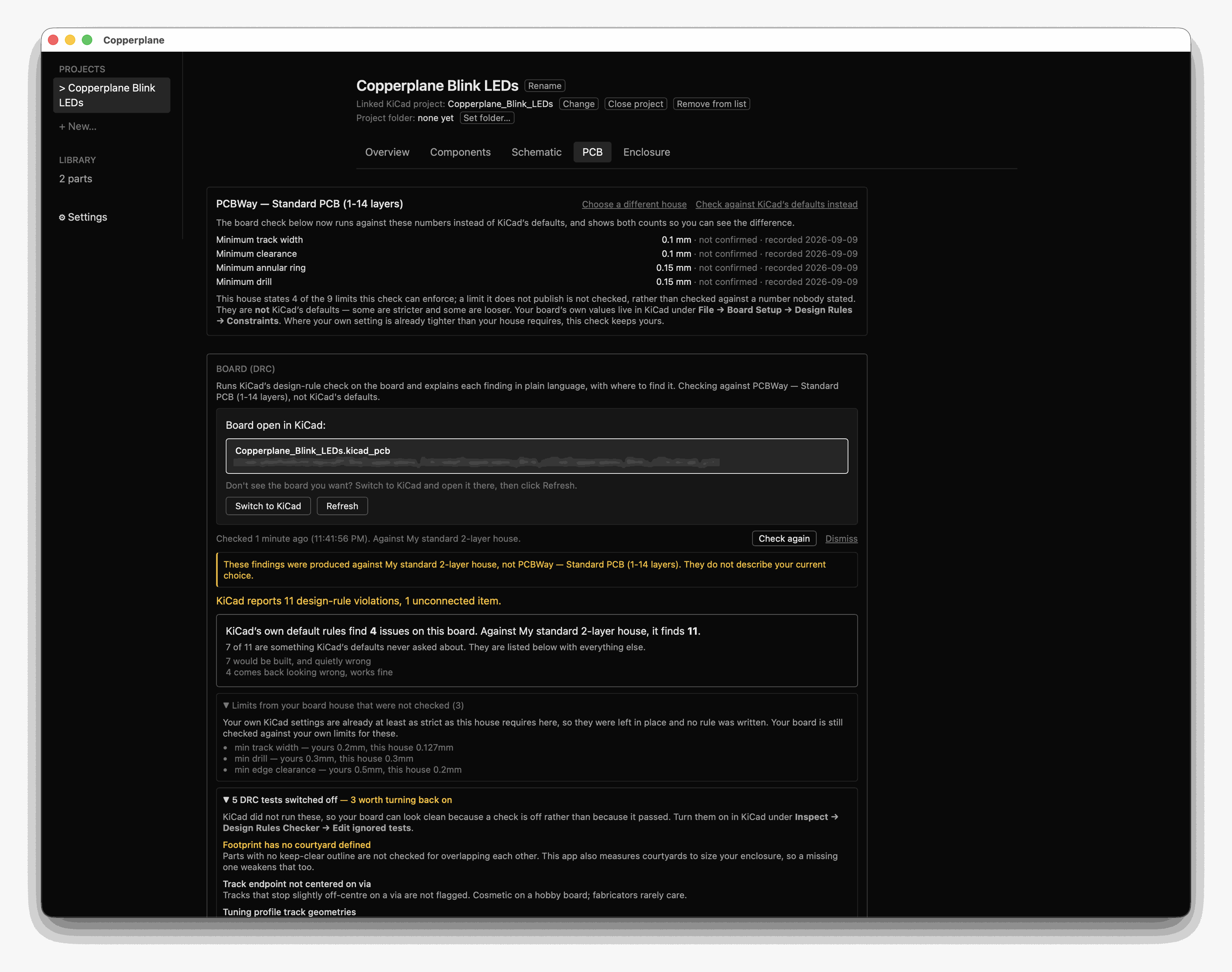
Two things on that screen are worth reading slowly.
A house only constrains what it publishes. The one above states 4 of the 9 limits this check can enforce. The other five are not checked rather than checked against a number nobody stated — which is the honest behaviour, and the reason a clean result against a sparse house means less than a clean result against a detailed one.
Every number says whether anyone has confirmed it. These read
not confirmed · recorded 2026-09-09 — read off the vendor’s published page on
that date and not verified since. A figure a fab quietly changed is a figure this
file will keep reporting until somebody checks.
The violation count moves with the house, sometimes a lot. That difference is the feature working, not a bug in it — and the check shows both counts so you can see which numbers caused it.
What these are, and what they are not
Section titled “What these are, and what they are not”- Read from the vendor’s page, not from anyone’s memory. Every value carries the URL it came from and the date it was read. Nothing is inferred, averaged, or filled in from a similar house.
- A field a vendor does not publish is absent, not guessed. An absent field produces no rule, so the app checks nothing for it rather than checking against a number nobody stated. PCBWay publishes four of the nine fields; that is what PCBWay’s entry contains.
- Every field arrives unconfirmed. You have not checked these and we cannot check them for you. The app says so on screen, next to every number.
- They go stale. Board houses change what they publish. The recorded date is shown beside every number, and the app warns when a set is over a year old.
- They are not a quote. They are what the vendor says it can build on the process named in the table above. A different process — heavier copper, more layers, a different finish — has different numbers, and these will be the wrong ones to check against. Confirm against the vendor’s own page before you order.
Where they live on your machine
Section titled “Where they live on your machine”Board houses are global: they are shared across every project, not stored per project. A project records which house it uses and the numbers it was last checked against, so an old finding never gets silently rewritten when you edit a house next month.
~/Library/Application Support/com.gittielabs.hardware-agent-studio/storage/library/houses/One <house-id>.house.json file per house. You can back these up, copy them
between machines, or hand one to a colleague — it is the same format the download
links above serve.
Starting from scratch instead
Section titled “Starting from scratch instead”If your fab is not listed, click Start from standard 2-layer numbers. That is a template, not a house: it names no vendor, and it is stricter than KiCad’s defaults on six fields and looser on two. Cloning it gives you a house of your own to rename and edit, which is the point — it is the numbers you start from before you have your own, never numbers to order against.