

Check a schematic or board
KiCad already tells you what is wrong with your board. The problem is that it
says things like power_pin_not_driven and Net-(U2-THRES), which are precise,
correct, and no help at all if nobody has explained them to you.
This runs those same checks and then translates the answer: which part, which pin, what it means, and whether it is a real electrical problem or a convention you have not satisfied yet.
It does not implement its own rule checker. It runs KiCad’s, via
kicad-cli — the command-line tool inside your KiCad installation — so the
findings are the same ones KiCad would give you.
DRC, on a board
Section titled “DRC, on a board”Open the PCB tab. If your project has a KiCad project linked, the app uses
that project’s board — KiCad does not need to be running. If nothing is
linked, it falls back to asking a running KiCad what it has open, or you can
pick a .kicad_pcb file yourself.
You get KiCad’s real violations, each with a plain-language explanation of what the rule means, why it fired on your board, and what would typically fix it.
ERC, on a schematic
Section titled “ERC, on a schematic”Open the Schematic tab. If your project has a KiCad project linked, the app resolves the schematic from that project file and checks it — KiCad does not need to be running here either.
If nothing is linked, you pick the file. That is the one place the old constraint still shows: KiCad’s live API can resolve the path of an open board but has no equivalent call for an open schematic, confirmed by testing against the real thing. Linking a project sidesteps it entirely, which is why linking is worth doing once.
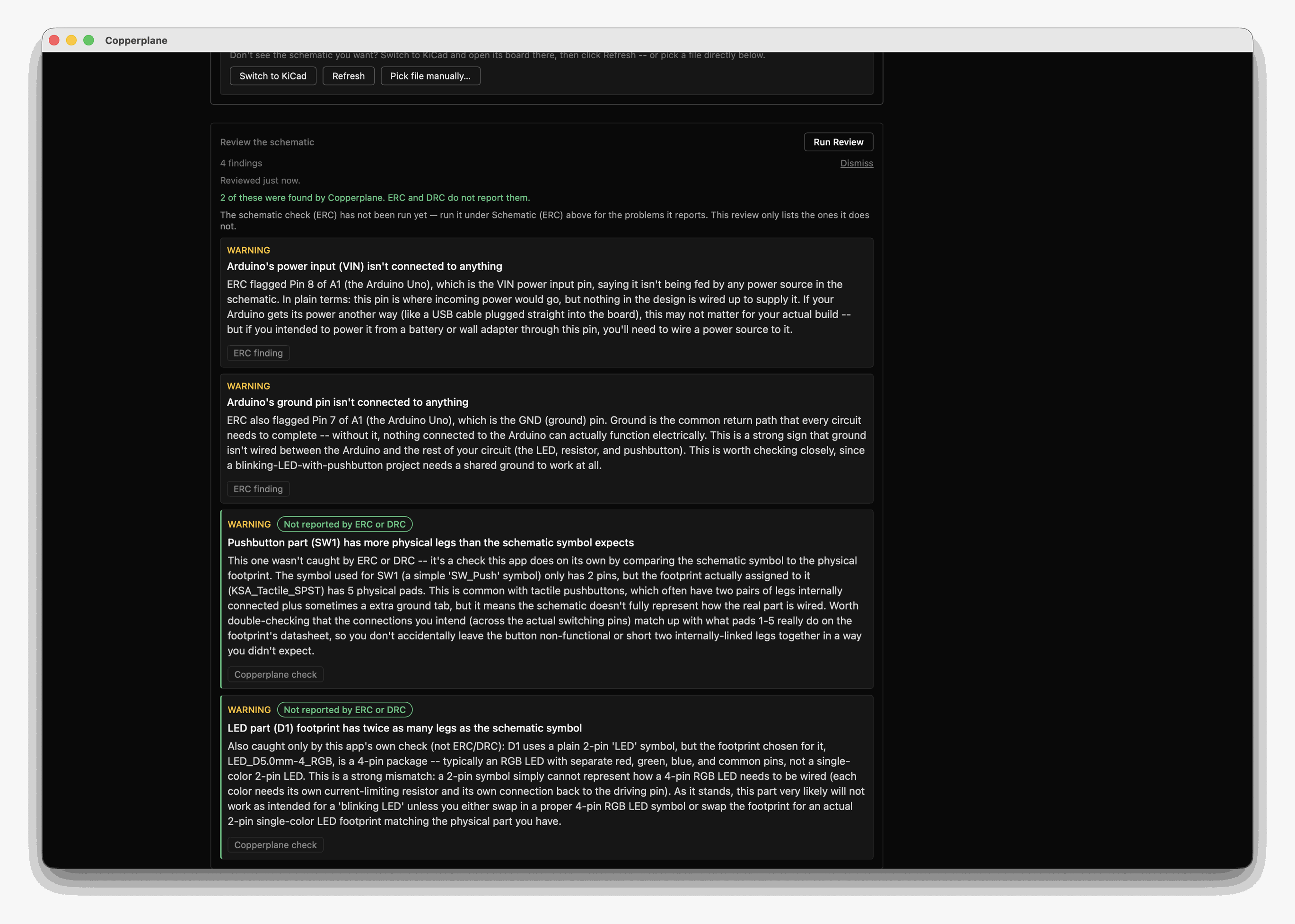
The findings marked not reported by ERC or DRC are the ones no rule checker produces: here, a symbol and its footprint disagreeing about how many pins a part has. Nothing in KiCad calls that an error, because in KiCad’s terms it is not one — it is a part described perfectly consistently that happens not to exist.
Reading the results
Section titled “Reading the results”Explanations are generated from the violation KiCad reported plus what the app knows about the parts involved. They are a translation layer, not a second opinion — the authority is KiCad’s own checker.
Two things to keep in mind. A suggested fix is a suggestion; you decide whether it is right for your board. And a clean check means your board passes the rules KiCad was configured with, which is not the same as the board being correct.
What this will not do
Section titled “What this will not do”It will not fix anything. No auto-correction, no rule editing, no writing to your board. It reads and explains; you edit in KiCad.
What it notices that KiCad does not
Section titled “What it notices that KiCad does not”ERC and DRC answer “does this break a rule KiCad was configured with?” They do not answer “is this a good idea?”, and a first board usually fails on the second question while passing the first.
So alongside the rule checks, the app reads your schematic’s actual connectivity — which pin joins which net — and raises a small number of design considerations: a regulator dropping more voltage than its package will shed as heat, a supply trace narrower than the current you said the board draws, a two-pin power header that goes in either way round, a dev board being fed the voltage it makes itself.
Each one names something real on your board, shows its arithmetic, and says where every number came from — your schematic, your answer, or a datasheet page. They are on the Overview tab, and the guide to what the app teaches covers how they choose their moment.
If it cannot run
Section titled “If it cannot run”The most common cause is that kicad-cli was not found. It lives inside your
KiCad installation, and on some platforms it is not on your PATH. Set the path
override in Settings, and use Copy Diagnostics if you need to report it.